第5章:工具使用(函数调用)
工具使用模式概述
迄今为止,我们讨论了主要涉及协调语言模型之间的交互以及管理智能体内部工作流程中信息流动的模式(链式、路由、并行化、反思)。然而,为了使智能体真正有用并能与现实世界或外部系统交互,它们需要使用工具的能力。
工具使用模式,通常通过称为函数调用的机制实现,使智能体能够与外部API、数据库、服务交互,甚至执行代码。它允许智能体核心中的LLM根据用户的请求或任务的当前状态决定何时以及如何使用特定的外部函数。
该过程通常包括:
- 工具定义: 将外部函数或功能定义和描述给LLM。该描述包括函数的目的、其名称以及它接受的参数,以及它们的类型和描述。
- LLM决策: 大型语言模型接收用户的请求和可用的工具定义。根据其对请求和工具的理解,LLM决定是否需要调用一个或多个工具以满足请求。
- 函数调用生成: 如果LLM决定使用工具,它将生成一个结构化输出(通常是JSON对象),该输出指定了要调用的工具名称以及传递给该工具的参数(参数),这些参数是从用户请求中提取出来的。
- 工具执行: 智能体框架或编排层拦截此结构化输出。它识别请求的工具,并使用提供的参数执行实际的外部函数。
- 观察/结果: 工具执行后的输出或结果返回给智能体。
- LLM 处理(可选但常见): 大型语言模型(LLM)接收工具的输出作为上下文,并利用它来向用户生成最终响应或决定工作流程中的下一步(这可能涉及调用另一个工具、进行反思或提供最终答案)。
这种模式至关重要,因为它打破了LLM训练数据的限制,使其能够访问最新信息,执行其内部无法完成的计算,与用户特定数据进行交互,或触发现实世界的行动。函数调用是连接LLM推理能力与外部丰富功能的技术机制。
虽然“函数调用”恰当地描述了调用特定的、预定义的代码函数,但考虑更广泛的概念“工具调用”是有益的。这个更宽泛的术语承认智能体的能力可以远远超出简单的函数执行。一个“工具”可以是一个传统的函数,但它也可以是一个复杂的API端点、对数据库的请求,甚至是对另一个专业智能体的指令。这种视角使我们能够设想更复杂的系统,例如,一个主要智能体可能会将复杂的数据分析任务委托给一个专门的“分析师智能体”,或者通过其API查询外部知识库。以“工具调用”的思维方式更能全面捕捉智能体作为数字资源和其他智能实体多样化生态系统中的协调者的全部潜力。
像LangChain、LangGraph以及谷歌智能体开发者工具包(ADK)等框架为定义工具并将它们集成到智能体工作流程中提供了强大的支持,通常利用现代大型语言模型(如Gemini或OpenAI系列)的本地函数调用能力。在这些框架的“画布”上,您定义工具,然后配置智能体(通常是LLM智能体)使其能够了解并使用这些工具。
工具使用是构建强大、交互式和外部感知智能体的基石模式。
实际应用与用例
工具使用模式适用于几乎任何场景,其中智能体需要超越生成文本,以执行操作或检索特定、动态信息。
- 从外部来源进行信息检索: 访问LLM训练数据中不存在的实时数据或信息。
用例: 天气智能体。 * 工具: 一个接受位置并返回当前天气状况的天气API。 * 智能体流程: 用户询问,“伦敦的天气怎么样?”,大型语言模型识别出需要使用天气工具,调用工具并传入“伦敦”,工具返回数据,大型语言模型将数据格式化为用户友好的响应。
- 与数据库和API交互: 执行对结构化数据的查询、更新或其他操作。
用例: 电子商务智能体。 * 工具: 使用API调用检查产品库存、获取订单状态或处理支付。 * 智能体流程: 用户询问“产品X有库存吗?”,大型语言模型调用库存API,工具返回库存数量,大型语言模型告知用户库存状态。
- 执行计算和数据分析: 使用外部计算器、数据分析库或统计工具。
用例: 金融智能体。 * 工具: 计算器功能、股票市场数据API、电子表格工具。 * 智能体流程: 用户询问“AAPL当前的股价是多少?如果我在150美元的价格买入100股,能获得多少潜在利润?”LLM调用股票API,获取当前股价,然后调用计算工具,获取结果,并格式化响应。
- 发送通讯: 发送电子邮件、消息或调用外部通信服务的API。
用例: 个人助理智能体。 * 工具: 一款邮件发送API。 * 智能体流程: 用户说:“给John发送一封关于明天会议的邮件。”大型语言模型调用邮件工具,从请求中提取收件人、主题和正文。
- 执行代码: 在安全环境中运行代码片段以执行特定任务。
用例: 编码助手智能体。 * 工具: 代码解释器。 * 智能体流程: 用户提供一段Python代码并询问,“这段代码的作用是什么?”,大型语言模型使用解释器工具运行代码并分析其输出。
- 控制其他系统或设备: 与智能家居设备、物联网平台或其他连接系统交互。
用例: 智能家居智能体。 * 工具: 一个用于控制智能灯的应用程序编程接口(API)。 * 智能体流程: 用户说:“关闭客厅的灯。”大型语言模型调用智能家居工具,并传入指令和目标设备。
工具使用是将语言模型从文本生成器转变为能够在数字或物理世界中感知、推理和行动的智能体的关键(见图1)。
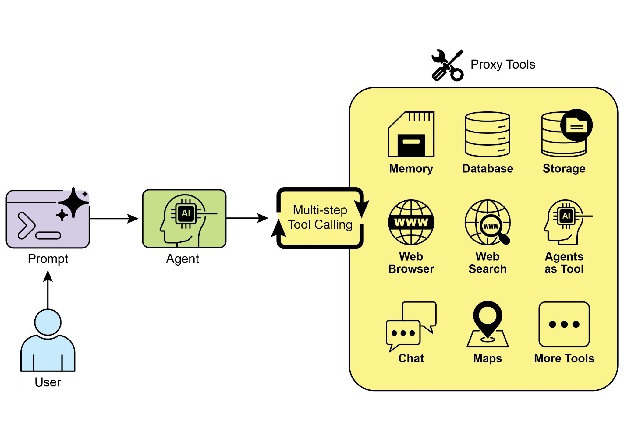
图1:智能体使用工具的一些示例
动手代码示例(LangChain)
在LangChain框架中实现工具使用是一个两阶段的过程。首先,定义一个或多个工具,通常是通过封装现有的Python函数或其他可执行组件来完成。随后,这些工具被绑定到一个语言模型上,从而使得模型在确定需要调用外部函数以满足用户查询时,能够生成一个结构化的工具使用请求。
以下实现将通过首先定义一个简单的函数来模拟一个信息检索工具来展示这一原则。随后,将构建并配置一个智能体,使其能够根据用户输入利用这个工具。执行此示例需要安装核心LangChain库和特定模型提供程序包。此外,与所选的语言模型服务进行适当的身份验证,通常是通过在本地环境中配置的API密钥,是必要的先决条件。
import os
import getpass
import asyncio
import nest_asyncio
from typing import List
from dotenv import load_dotenv
import logging
from langchain_google_genai import ChatGoogleGenerativeAI
from langchain_core.prompts import ChatPromptTemplate
from langchain_core.tools import tool as langchain_tool
from langchain.agents import create_tool_calling_agent, AgentExecutor

# UNCOMMENT
# Prompt the user securely and set API keys as an environment variables
os.environ["GOOGLE_API_KEY"] = getpass.getpass("Enter your Google API key: ")
os.environ["OPENAI_API_KEY"] = getpass.getpass("Enter your OpenAI API key: ")

try:
    # A model with function/tool calling capabilities is required.
    llm = ChatGoogleGenerativeAI(model="gemini-2.0-flash", temperature=0)
    print(f"✅ Language model initialized: {llm.model}")
except Exception as e:
    print(f"🛑 Error initializing language model: {e}")
    llm = None

# --- Define a Tool ---
@langchain_tool
def search_information(query: str) -> str:
    """Provides factual information on a given topic. Use this tool to find answers to phrases
    like 'capital of France' or 'weather in London?'."""
    print(f"\n--- 🛠️ Tool Called: search_information with query: '{query}' ---")
    # Simulate a search tool with a dictionary of predefined results.
    simulated_results = {
        "weather in london": "The weather in London is currently cloudy with a temperature of 15°C.",
        "capital of france": "The capital of France is Paris.",
        "population of earth": "The estimated population of Earth is around 8 billion people.",
        "tallest mountain": "Mount Everest is the tallest mountain above sea level.",
        "default": f"Simulated search result for '{query}': No specific information found, but the topic seems interesting."
    }
    result = simulated_results.get(query.lower(), simulated_results["default"])
    print(f"--- TOOL RESULT: {result} ---")
    return result

tools = [search_information]

# --- Create a Tool-Calling Agent ---
if llm:
    # This prompt template requires an `agent_scratchpad` placeholder for the agent's internal steps.
    agent_prompt = ChatPromptTemplate.from_messages([
        ("system", "You are a helpful assistant."),
        ("human", "{input}"),
        ("placeholder", "{agent_scratchpad}"),
    ])
    # Create the agent, binding the LLM, tools, and prompt together.
    agent = create_tool_calling_agent(llm, tools, agent_prompt)
    # AgentExecutor is the runtime that invokes the agent and executes the chosen tools.
    # The 'tools' argument is not needed here as they are already bound to the agent.
    agent_executor = AgentExecutor(agent=agent, verbose=True, tools=tools)

async def run_agent_with_tool(query: str):
    """Invokes the agent executor with a query and prints the final response."""
    print(f"\n--- 🏃 Running Agent with Query: '{query}' ---")
    try:
        response = await agent_executor.ainvoke({"input": query})
        print("\n--- ✅ Final Agent Response ---")
        print(response["output"])
    except Exception as e:
        print(f"\n🛑 An error occurred during agent execution: {e}")

async def main():
    """Runs all agent queries concurrently."""
    tasks = [
        run_agent_with_tool("What is the capital of France?"),
        run_agent_with_tool("What's the weather like in London?"),
        run_agent_with_tool("Tell me something about dogs.")  # Should trigger the default tool response
    ]
    await asyncio.gather(*tasks)

nest_asyncio.apply()
asyncio.run(main())
代码使用LangChain库和Google Gemini模型设置了一个工具调用智能体。它定义了一个名为search_information的工具,该工具模拟为特定查询提供事实性答案。该工具为“伦敦天气”、“法国首都”和“地球人口”等查询预设了响应,并为其他查询设置了默认响应。初始化了一个ChatGoogleGenerativeAI模型,确保其具有工具调用功能。创建了一个ChatPromptTemplate来指导智能体的交互。使用create_tool_calling_agent函数将语言模型、工具和提示结合成一个智能体。然后设置了一个AgentExecutor来管理智能体的执行和工具调用。定义了run_agent_with_tool异步函数,用于调用智能体并打印结果。主异步函数准备多个查询以并发运行。这些查询旨在测试search_information工具的特定和默认响应。最后,通过asyncio.run(main())调用执行所有智能体任务。代码在继续设置和执行智能体之前,对LLM的初始化成功进行了检查。
动手代码示例(CrewAI)
此代码提供了一个在CrewAI框架中实现函数调用(工具)的实用示例。它设置了一个简单场景,其中智能体配备了一个工具来查找信息。该示例具体演示了使用此智能体和工具获取模拟股票价格的过程。
# pip install crewai langchain-openai
import os
from crewai import Agent, Task, Crew
from crewai.tools import tool
import logging

# --- Best Practice: Configure Logging ---
# A basic logging setup helps in debugging and tracking the crew's execution.
logging.basicConfig(level=logging.INFO, format='%(asctime)s - %(levelname)s - %(message)s')

# --- Set up your API Key ---
# For production, it's recommended to use a more secure method for key management
# like environment variables loaded at runtime or a secret manager.
# # Set the environment variable for your chosen LLM provider (e.g., OPENAI_API_KEY)
# os.environ["OPENAI_API_KEY"] = "YOUR_API_KEY"
# os.environ["OPENAI_MODEL_NAME"] = "gpt-4o"

# --- 1. Refactored Tool: Returns Clean Data ---
# The tool now returns raw data (a float) or raises a standard Python error.
# This makes it more reusable and forces the agent to handle outcomes properly.
@tool("Stock Price Lookup Tool")
def get_stock_price(ticker: str) -> float:
    """Fetches the latest simulated stock price for a given stock ticker symbol.
    Returns the price as a float. Raises a ValueError if the ticker is not found."""
    logging.info(f"Tool Call: get_stock_price for ticker '{ticker}'")
    simulated_prices = {
        "AAPL": 178.15,
        "GOOGL": 1750.30,
        "MSFT": 425.50,
    }
    price = simulated_prices.get(ticker.upper())
    if price is not None:
        return price
    else:
        # Raising a specific error is better than returning a string.
        # The agent is equipped to handle exceptions and can decide on the next action.
        raise ValueError(f"Simulated price for ticker '{ticker.upper()}' not found.")

# --- 2. Define the Agent ---
# The agent definition remains the same, but it will now leverage the improved tool.
financial_analyst_agent = Agent(
    role='Senior Financial Analyst',
    goal='Analyze stock data using provided tools and report key prices.',
    backstory="You are an experienced financial analyst adept at using data sources to find stock information. You provide clear, direct answers.",
    verbose=True,
    tools=[get_stock_price],
    # Allowing delegation can be useful, but is not necessary for this simple task.
    allow_delegation=False,
)

# --- 3. Refined Task: Clearer Instructions and Error Handling ---
# The task description is more specific and guides the agent on how to react
# to both successful data retrieval and potential errors.
analyze_aapl_task = Task(
    description=(
        "What is the current simulated stock price for Apple (ticker: AAPL)? "
        "Use the 'Stock Price Lookup Tool' to find it. "
        "If the ticker is not found, you must report that you were unable to retrieve the price."
    ),
    expected_output=(
        "A single, clear sentence stating the simulated stock price for AAPL. "
        "For example: 'The simulated stock price for AAPL is $178.15.' "
        "If the price cannot be found, state that clearly."
    ),
    agent=financial_analyst_agent,
)

# --- 4. Formulate the Crew ---
# The crew orchestrates how the agent and task work together.
financial_crew = Crew(
    agents=[financial_analyst_agent],
    tasks=[analyze_aapl_task],
    verbose=True  # Set to False for less detailed logs in production
)

# --- 5. Run the Crew within a Main Execution Block ---
# Using a __name__ == "__main__": block is a standard Python best practice.
def main():
    """Main function to run the crew."""
    # Check for API key before starting to avoid runtime errors.
    if not os.environ.get("OPENAI_API_KEY"):
        print("ERROR: The OPENAI_API_KEY environment variable is not set.")
        print("Please set it before running the script.")
        return
    print("\n## Starting the Financial Crew...")
    print("---------------------------------")
    # The kickoff method starts the execution.
    result = financial_crew.kickoff()
    print("\n---------------------------------")
    print("## Crew execution finished.")
    print("\nFinal Result:\n", result)

if __name__ == "__main__":
    main()
此代码演示了一个使用Crew.ai库模拟财务分析任务的简单应用程序。它定义了一个自定义工具get_stock_price,该工具模拟查找预定义股票代码的股价。该工具旨在为有效的股票代码返回一个浮点数,或对无效的股票代码引发ValueError。创建了一个名为financial_analyst_agent的Crew.ai智能体,其角色为高级财务分析师。此智能体被赋予了get_stock_price工具以进行交互。定义了一个任务analyze_aapl_task,具体指示智能体使用该工具查找AAPL的模拟股价。任务描述中包含了在使用工具时如何处理成功和失败情况的具体说明。组装了一个团队,包括financial_analyst_agent和analyze_aapl_task。为智能体和团队启用了详细日志记录的verbose设置。脚本的主要部分在标准if name == "main":块中使用kickoff()方法运行团队的任务。在启动团队之前,它检查OPENAI_API_KEY环境变量是否设置,这是智能体运行所必需的。然后,将团队执行的结果(即任务的输出)打印到控制台。代码还包括基本的日志配置,以更好地跟踪团队的动作和工具调用。它使用环境变量进行API密钥管理,尽管它指出在生产环境中推荐使用更安全的方法。简而言之,核心逻辑展示了如何在Crew.ai中定义工具、智能体和任务以创建协作工作流程。
动手代码(谷歌ADK)
谷歌智能体开发者工具包(ADK)包含一系列原生集成的工具库,可以直接集成到智能体的功能中。谷歌搜索:此类组件的一个主要例子是谷歌搜索工具。该工具作为直接连接到谷歌搜索引擎的界面,使智能体具备了执行网络搜索和检索外部信息的功能。
from google.adk.agents import Agent
from google.adk.runners import Runner
from google.adk.sessions import InMemorySessionService
from google.adk.tools import google_search
import nest_asyncio
import asyncio

# Define variables required for Session setup and Agent execution
APP_NAME = "Google Search_agent"
USER_ID = "user1234"
SESSION_ID = "1234"

# Define Agent with access to search tool
root_agent = Agent(
    name="basic_search_agent",
    model="gemini-2.0-flash-exp",
    description="Agent to answer questions using Google Search.",
    instruction="I can answer your questions by searching the internet. Just ask me anything!",
    tools=[google_search]  # Google Search is a pre-built tool to perform Google searches.
)

# Agent Interaction
async def call_agent(query):
    """Helper function to call the agent with a query."""
    # Session and Runner
    session_service = InMemorySessionService()
    session = await session_service.create_session(
        app_name=APP_NAME, user_id=USER_ID, session_id=SESSION_ID
    )
    runner = Runner(agent=root_agent, app_name=APP_NAME, session_service=session_service)
    content = types.Content(role='user', parts=[types.Part(text=query)])
    events = runner.run(user_id=USER_ID, session_id=SESSION_ID, new_message=content)
    for event in events:
        if event.is_final_response():
            final_response = event.content.parts[0].text
            print("Agent Response: ", final_response)

nest_asyncio.apply()
asyncio.run(call_agent("what's the latest ai news?"))
此代码演示了如何创建和使用一个由Google ADK for Python驱动的基本智能体。该智能体旨在通过利用Google搜索作为工具来回答问题。首先,从IPython、google.adk和google.genai库中导入必要的库。定义了应用程序名称、用户ID和会话ID的常量。创建了一个名为"basic_search_agent"的智能体实例,其中包含描述和指示其用途的说明。它被配置为使用Google搜索工具,这是ADK提供的预构建工具。初始化了一个InMemorySessionService(见第8章)来管理智能体的会话。为指定的应用程序、用户和会话ID创建了一个新的会话。实例化了一个Runner,将创建的智能体与会话服务链接。这个Runner负责在会话中执行智能体的交互。定义了一个辅助函数call_agent,以简化向智能体发送查询和处理响应的过程。在call_agent内部,将用户的查询格式化为带有角色'user'的types.Content对象。使用用户ID、会话ID和新的消息内容调用runner.run方法。runner.run方法返回代表智能体动作和响应的事件列表。代码遍历这些事件以找到最终响应。如果识别出事件是最终响应,则提取该响应的文本内容。提取的智能体响应随后打印到控制台。最后,通过调用call_agent函数并传入查询"最新的AI新闻是什么?"来演示智能体的实际应用。
代码执行: Google ADK集成了用于特定任务的集成组件,包括一个动态代码执行环境。内置的代码执行工具为智能体提供了一个沙盒化的Python解释器。这使得模型能够编写和运行代码以执行计算任务、操作数据结构和执行过程脚本。这种功能对于解决需要确定性逻辑和精确计算的问题至关重要,这些问题仅凭概率性语言生成是难以解决的。
import os
import getpass
import asyncio
import nest_asyncio
from typing import List
from dotenv import load_dotenv
import logging
from google.adk.agents import Agent as ADKAgent, LlmAgent
from google.adk.runners import Runner
from google.adk.sessions import InMemorySessionService
from google.adk.tools import google_search
from google.adk.code_executors import BuiltInCodeExecutor
from google.genai import types

# Define variables required for Session setup and Agent execution
APP_NAME = "calculator"
USER_ID = "user1234"
SESSION_ID = "session_code_exec_async"

# Agent Definition
code_agent = LlmAgent(
    name="calculator_agent",
    model="gemini-2.0-flash",
    code_executor=BuiltInCodeExecutor(),
    instruction="""You are a calculator agent.
When given a mathematical expression, write and execute Python code to calculate the result.
Return only the final numerical result as plain text, without markdown or code blocks.
""",
    description="Executes Python code to perform calculations.",
)

# Agent Interaction (Async)
async def call_agent_async(query):
    # Session and Runner
    session_service = InMemorySessionService()
    session = await session_service.create_session(app_name=APP_NAME, user_id=USER_ID, session_id=SESSION_ID)
    runner = Runner(agent=code_agent, app_name=APP_NAME, session_service=session_service)
    content = types.Content(role='user', parts=[types.Part(text=query)])
    print(f"\n--- Running Query: {query} ---")
    final_response_text = "No final text response captured."
    try:
        # Use run_async
        async for event in runner.run_async(user_id=USER_ID, session_id=SESSION_ID, new_message=content):
            print(f"Event ID: {event.id}, Author: {event.author}")
            # --- Check for specific parts FIRST ---
            if event.content and event.content.parts and event.is_final_response():
                for part in event.content.parts:
                    # Iterate through all parts
                    if part.executable_code:
                        # Access the actual code string via .code
                        print(f"  Debug: Agent generated code:\n```python\n{part.executable_code.code}\n```")
                    elif part.code_execution_result:
                        # Access outcome and output correctly
                        print(f"  Debug: Code Execution Result: {part.code_execution_result.outcome} - Output:\n{part.code_execution_result.output}")
                    elif part.text and not part.text.isspace():
                        print(f"  Text: '{part.text.strip()}'")
                    # Also print any text parts found in any event for debugging
                    # --- Check for final response AFTER specific parts ---
                    text_parts = [part.text for part in event.content.parts if part.text]
                    final_result = "".join(text_parts)
                    print(f"==> Final Agent Response: {final_result}")
    except Exception as e:
        print(f"ERROR during agent run: {e}")
    print("-" * 30)

# Main async function to run the examples
async def main():
    await call_agent_async("Calculate the value of (5 + 7) * 3")
    await call_agent_async("What is 10 factorial?")

# Execute the main async function
try:
    nest_asyncio.apply()
    asyncio.run(main())
except RuntimeError as e:
    # Handle specific error when running asyncio.run in an already running loop (like Jupyter/Colab)
    if "cannot be called from a running event loop" in str(e):
        print("\nRunning in an existing event loop (like Colab/Jupyter).")
        print("Please run `await main()` in a notebook cell instead.")
        # If in an interactive environment like a notebook, you might need to run:
        # await main()
    else:
        raise e
# Re-raise other runtime errors
本脚本使用谷歌的智能体开发工具包(ADK)创建了一个智能体,该智能体通过编写和执行Python代码来解决数学问题。它定义了一个LlmAgent,并专门指示其作为计算器使用,并配备了内置代码执行工具。主要逻辑位于call_agent_async函数中,该函数将用户的查询发送到智能体的运行器,并处理产生的事件。在这个函数内部,一个异步循环遍历事件,打印生成的Python代码及其执行结果以供调试。代码仔细区分了这些中间步骤和包含数值答案的最终事件。最后,主函数使用两个不同的数学表达式运行智能体,以展示其执行计算的能力。
企业搜索: 此代码定义了一个使用Python中的google.adk库的Google ADK应用程序。它特别使用了一个VSearchAgent,该智能体旨在通过搜索指定的Vertex AI Search数据存储来回答问题。代码初始化了一个名为"q2_strategy_vsearch_agent"的VSearchAgent,提供了描述、要使用的模型("gemini-2.0-flash-exp")以及Vertex AI Search数据存储的ID。预期DATASTORE_ID将被设置为环境变量。然后,它为智能体设置了一个运行器,使用InMemorySessionService来管理对话历史。定义了一个异步函数call_vsearch_agent_async,用于与智能体交互。此函数接收一个查询,构建一个消息内容对象,并调用运行器的run_async方法将查询发送给智能体。然后,该函数将智能体的响应流式传输回控制台。它还打印有关最终响应的信息,包括来自数据存储的任何来源归属。错误处理包括捕获智能体执行期间的异常,提供有关潜在问题(如错误的存储ID或缺少权限)的提示性消息。还提供了一个名为run_vsearch_example的另一个异步函数,以演示如何使用示例查询调用智能体。主执行块检查DATASTORE_ID是否已设置,然后使用asyncio.run运行示例。它包括一个检查,以处理代码在已有一个运行的事件循环的环境中运行的情况,例如Jupyter笔记本。
import asyncio
from google.genai import types
from google.adk import agents
from google.adk.runners import Runner
from google.adk.sessions import InMemorySessionService
import os

# --- Configuration ---
# Ensure you have set your GOOGLE_API_KEY and DATASTORE_ID environment variables
# For example:
# os.environ["GOOGLE_API_KEY"] = "YOUR_API_KEY"
# os.environ["DATASTORE_ID"] = "YOUR_DATASTORE_ID"
DATASTORE_ID = os.environ.get("DATASTORE_ID")

# --- Application Constants ---
APP_NAME = "vsearch_app"
USER_ID = "user_123"  # Example User ID
SESSION_ID = "session_456"  # Example Session ID

# --- Agent Definition (Updated with the newer model from the guide) ---
vsearch_agent = agents.VSearchAgent(
    name="q2_strategy_vsearch_agent",
    description="Answers questions about Q2 strategy documents using Vertex AI Search.",
    model="gemini-2.0-flash-exp",  # Updated model based on the guide's examples
    datastore_id=DATASTORE_ID,
    model_parameters={"temperature": 0.0}
)

# --- Runner and Session Initialization ---
runner = Runner(
    agent=vsearch_agent,
    app_name=APP_NAME,
    session_service=InMemorySessionService(),
)

# --- Agent Invocation Logic ---
async def call_vsearch_agent_async(query: str):
    """Initializes a session and streams the agent's response."""
    print(f"User: {query}")
    print("Agent: ", end="", flush=True)
    try:
        # Construct the message content correctly
        content = types.Content(role='user', parts=[types.Part(text=query)])
        # Process events as they arrive from the asynchronous runner
        async for event in runner.run_async(
            user_id=USER_ID,
            session_id=SESSION_ID,
            new_message=content
        ):
            # For token-by-token streaming of the response text
            if hasattr(event, 'content_part_delta') and event.content_part_delta:
                print(event.content_part_delta.text, end="", flush=True)
            # Process the final response and its associated metadata
            if event.is_final_response():
                print()  # Newline after the streaming response
                if event.grounding_metadata:
                    print(f"  (Source Attributions: {len(event.grounding_metadata.grounding_attributions)} sources found)")
                else:
                    print("  (No grounding metadata found)")
                print("-" * 30)
    except Exception as e:
        print(f"\nAn error occurred: {e}")
        print("Please ensure your datastore ID is correct and that the service account has the necessary permissions.")
        print("-" * 30)

# --- Run Example ---
async def run_vsearch_example():
    # Replace with a question relevant to YOUR datastore content
    await call_vsearch_agent_async("Summarize the main points about the Q2 strategy document.")
    await call_vsearch_agent_async("What safety procedures are mentioned for lab X?")

# --- Execution ---
if __name__ == "__main__":
    if not DATASTORE_ID:
        print("Error: DATASTORE_ID environment variable is not set.")
    else:
        try:
            asyncio.run(run_vsearch_example())
        except RuntimeError as e:
            # This handles cases where asyncio.run is called in an environment
            # that already has a running event loop (like a Jupyter notebook).
            if "cannot be called from a running event loop" in str(e):
                print("Skipping execution in a running event loop. Please run this script directly.")
            else:
                raise e
总体而言,此代码提供了一个构建基于Vertex AI Search的问答式人工智能应用的基本框架,该应用能够根据存储在数据存储中的信息来回答问题。它展示了如何定义智能体、设置运行器以及如何异步地与智能体交互并流式传输响应。重点在于从特定的数据存储中检索和综合信息以回答用户查询。
顶点扩展: 顶点 AI 扩展是一种结构化的 API 封装,允许模型连接到外部 API 以进行实时数据处理和动作执行。扩展提供企业级的安全性、数据隐私和性能保证。它们可用于生成和运行代码、查询网站以及分析来自私有数据存储的信息。Google 为常见的用例(如代码解释器和顶点 AI 搜索)提供了预构建的扩展,并允许创建自定义扩展。扩展的主要优势包括强大的企业控制和与其他 Google 产品的无缝集成。扩展与函数调用的主要区别在于它们的执行方式:顶点 AI 会自动执行扩展,而函数调用则需要用户或客户端手动执行。
概览
内容: 大型语言模型(LLM)是强大的文本生成器,但它们在本质上与外界隔绝。它们的知识是静态的,仅限于训练数据,且缺乏执行动作或检索实时信息的能力。这种固有的限制阻止了它们完成需要与外部API、数据库或服务交互的任务。没有连接到这些外部系统的桥梁,它们解决现实世界问题的实用性受到了严重限制。
原因: 工具使用模式,通常通过函数调用实现,为解决这个问题提供了一个标准化的解决方案。它通过以LLM能够理解的方式描述可用的外部函数,或“工具”,来实现。基于用户的请求,智能体LLM可以决定是否需要工具,并生成一个结构化数据对象(如JSON),指定要调用的函数及其参数。编排层执行这个函数调用,获取结果,并将其反馈给LLM。这使得LLM能够将最新的外部信息或行动的结果纳入其最终响应中,有效地赋予它行动的能力。
经验法则: 当智能体需要跳出LLM的内部知识并与其他外部世界交互时,应使用工具使用模式。这对于需要实时数据(例如,查看天气、股票价格)、访问私有或专有信息(例如,查询公司的数据库)、执行精确计算、执行代码或在其他系统中触发操作(例如,发送电子邮件、控制智能设备)的任务至关重要。
视觉摘要:
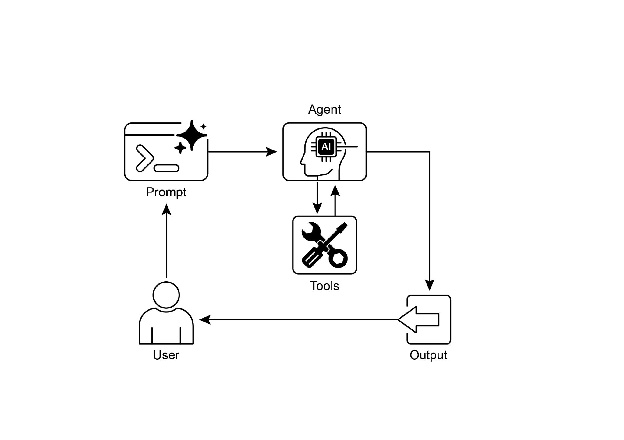
图2:工具使用设计模式
关键要点
工具使用(函数调用)允许智能体与外部系统交互并访问动态信息。 这涉及到定义智能体可以理解的具有清晰描述和参数的工具。 大型语言模型(LLM)决定何时使用工具,并生成结构化函数调用。 智能体框架执行实际的工具调用,并将结果返回给LLM。 工具使用对于构建能够执行现实世界动作并提供最新信息的智能体至关重要。 LangChain通过使用@tool装饰器简化工具定义,并提供create_tool_calling_agent和AgentExecutor用于构建使用工具的智能体。 谷歌ADK(应用程序开发工具包)提供了一系列非常实用的预构建工具,例如谷歌搜索、代码执行和Vertex AI搜索工具。
结论
工具使用模式是扩展大型语言模型功能范围的关键架构原则,使其超越其固有的文本生成能力。通过使模型能够与外部软件和数据源进行交互,这种范式允许智能体执行操作、执行计算并从其他系统中检索信息。这个过程涉及模型在确定这样做是满足用户查询的必要条件时,生成一个结构化请求以调用外部工具。LangChain、Google ADK和Crew AI等框架提供了结构化抽象和组件,这些组件有助于整合这些外部工具。这些框架管理着将工具规范暴露给模型并解析其后续工具使用请求的过程。这简化了开发复杂智能体系统的工作,这些系统可以与外部数字环境交互并采取行动。