第8章:内存管理
有效的内存管理对于智能体保留信息至关重要。智能体需要不同类型的内存,就像人类一样,以高效地运行。本章深入探讨内存管理,特别是针对智能体的即时(短期)和持久(长期)内存需求进行阐述。
在智能体系统中,记忆指的是智能体保留和利用过去交互、观察和学习经验信息的能力。这种能力使智能体能够做出明智的决策,维持对话上下文,并随着时间的推移而改进。智能体记忆通常分为两大类:
- 短期记忆(上下文记忆):与工作记忆类似,它存储当前正在处理或最近访问的信息。对于使用大型语言模型(LLM)的智能体来说,短期记忆主要存在于上下文窗口中。这个窗口包含最近的消息、智能体回复、工具使用结果以及当前交互中的智能体反思,所有这些都会影响LLM后续的响应和行动。上下文窗口的容量有限,限制了智能体可以直接访问的最近信息量。有效的短期记忆管理涉及在有限的空间内保留最相关的信息,可能通过总结较老的对话片段或强调关键细节等技术实现。具有“长上下文”窗口的模型的出现只是扩大了这种短期记忆的容量,允许在单个交互中存储更多信息。然而,这种上下文仍然是短暂的,一旦会话结束就会消失,每次处理都可能代价高昂且效率低下。因此,智能体需要不同的记忆类型来实现真正的持久性,从过去的交互中召回信息,并构建持久的知识库。
- 长期记忆(持久记忆):这充当信息智能体需要在不同交互、任务或较长时间内保留信息的存储库,类似于长期知识库。数据通常存储在智能体即时处理环境之外,通常在数据库、知识图谱或向量数据库中。在向量数据库中,信息被转换为数值向量并存储,使智能体能够根据语义相似性而不是精确的关键词匹配来检索数据,这个过程称为语义搜索。当智能体需要从长期记忆中获取信息时,它会查询外部存储,检索相关数据,并将其整合到短期上下文中以供即时使用,从而将先前知识与当前交互相结合。
实际应用与用例
内存管理对于智能体跟踪信息和随时间智能执行至关重要。这对于智能体超越基本问答能力至关重要。应用包括:
- 聊天机器人和对话式AI: 维持对话流畅性依赖于短期记忆。聊天机器人生成连贯回复需要记住之前的用户输入。长期记忆使聊天机器人生成能够回忆用户偏好、历史问题或之前的讨论,提供个性化且持续的交互。
- 面向任务的智能体: 管理多步骤任务的智能体需要短期记忆来追踪之前的步骤、当前进度和整体目标。这些信息可能存在于任务的上下文或临时存储中。长期记忆对于访问不在即时上下文中的特定用户相关数据至关重要。
- 个性化体验: 提供定制交互的智能体利用长期记忆来存储和检索用户偏好、过往行为和个人信息。这使得智能体能够调整其响应和建议。
- 学习和改进:智能体可以通过从过去的交互中学习来优化其性能。成功的策略、错误和新信息被存储在长期记忆中,从而促进未来的适应。强化学习智能体正是通过这种方式存储学习到的策略或知识。
- 信息检索(RAG): 用于回答问题的智能体访问知识库,其长期记忆通常在检索增强生成(RAG)中实现。智能体检索相关文档或数据以提供其回答的依据。
- 自主系统: 机器人或自动驾驶汽车需要存储地图、路线、物体位置和已学习的行为等信息。这包括对即时周围环境的短期记忆和对一般环境知识的长期记忆。
内存使智能体能够维持历史记录、学习、个性化交互以及管理复杂、与时间相关的难题。
动手编码:Google Agent 开发工具包(ADK)中的内存管理
谷歌智能体开发者工具包(ADK)提供了一种管理上下文和内存的结构化方法,包括实际应用所需的组件。对于需要保留信息的智能体,掌握ADK的会话、状态和内存至关重要。
正如人类互动一样,智能体需要能够回忆起之前的交流,以进行连贯和自然的对话。ADK通过三个核心概念及其相关服务简化了上下文管理。
每次与智能体的交互都可以视为一个独特的对话线程。智能体可能需要访问早期交互中的数据。ADK按照以下结构进行设计:
- 会话: 一个单独的聊天线程,记录该特定交互的消息和动作(事件),并存储与该对话相关的临时数据(状态)。
- 状态(session.state): 存储在会话中的数据,包含仅与当前活跃聊天线程相关的信息。
- 内存:一个可搜索的信息库,信息来源于各种过去的聊天或外部来源,作为即时对话之外的数据检索资源。
ADK为构建复杂、有状态和上下文感知的智能体提供了专门的服务来管理关键组件。SessionService通过处理会话的启动、记录和终止来管理聊天线程(会话对象),而MemoryService则负责长期知识的存储和检索(Memory)。
SessionService和MemoryService都提供了多种配置选项,使用户可以根据应用需求选择存储方法。为了测试目的,提供了内存中的选项,但数据不会在重启后持久化。对于持久存储和可扩展性,ADK还支持数据库和基于云的服务。
会话:跟踪每次聊天
ADK中的会话对象旨在跟踪和管理单个聊天线程。与智能体开始对话后,SessionService会生成一个会话对象,表示为google.adk.sessions.Session。此对象封装了与特定对话线程相关的所有数据,包括唯一标识符(id、app_name、user_id)、按时间顺序的事件记录(作为事件对象)、称为状态的会话特定临时数据存储区域以及表示最后更新时间的戳。开发者通常通过SessionService间接与Session对象交互。SessionService负责管理对话会话的生命周期,包括启动新会话、恢复先前会话、记录会话活动(包括状态更新)、识别活跃会话以及管理会话数据的删除。ADK提供了多种SessionService实现,它们具有不同的会话历史和临时数据存储机制,例如InMemorySessionService,适用于测试但无法提供应用程序重启后的数据持久性。
# Example: Using InMemorySessionService
# This is suitable for local development and testing where data
# persistence across application restarts is not required.
from google.adk.sessions import InMemorySessionService

session_service = InMemorySessionService()
然后是DatabaseSessionService,如果您希望将数据可靠地保存到您管理的数据库中。
# Example: Using DatabaseSessionService
# This is suitable for production or development requiring persistent storage.
# You need to configure a database URL (e.g., for SQLite, PostgreSQL, etc.).
# Requires: pip install google-adk[sqlalchemy] and a database driver
# (e.g., psycopg2 for PostgreSQL)

from google.adk.sessions import DatabaseSessionService

# Example using a local SQLite file:
db_url = "sqlite:///./my_agent_data.db"
session_service = DatabaseSessionService(db_url=db_url)
此外,还有VertexAiSessionService,它利用Vertex AI基础设施在Google Cloud上实现可扩展的生产。
# Example: Using VertexAiSessionService
# This is suitable for scalable production on Google Cloud Platform, leveraging
# Vertex AI infrastructure for session management.
# Requires: pip install google-adk[vertexai] and GCP setup/authentication
from google.adk.sessions import VertexAiSessionService

PROJECT_ID = "your-gcp-project-id"  # Replace with your GCP project ID
LOCATION = "us-central1"  # Replace with your desired GCP location
# The app_name used with this service should correspond to the Reasoning Engine ID or name
REASONING_ENGINE_APP_NAME = "projects/your-gcp-project-id/locations/us-central1/reasoningEngines/your-engine-id"  # Replace with your Reasoning Engine resource name

session_service = VertexAiSessionService(project=PROJECT_ID, location=LOCATION)

# When using this service, pass REASONING_ENGINE_APP_NAME to service methods:
# session_service.create_session(app_name=REASONING_ENGINE_APP_NAME, ...)
# session_service.get_session(app_name=REASONING_ENGINE_APP_NAME, ...)
# session_service.append_event(session, event, app_name=REASONING_ENGINE_APP_NAME)
# session_service.delete_session(app_name=REASONING_ENGINE_APP_NAME, ...)
选择合适的SessionService至关重要,因为它决定了智能体的交互历史和临时数据如何存储以及它们的持久性。
每次消息交换都涉及一个循环过程:接收一条消息,运行者使用SessionService检索或建立会话,智能体使用会话的上下文(状态和历史交互)处理消息,智能体生成响应并可能更新状态,运行者将此封装为事件,session_service.append_event方法记录新事件并更新存储中的状态。然后,会话等待下一条消息。理想情况下,在交互结束时使用delete_session方法来终止会话。这个过程说明了SessionService如何通过管理会话特定的历史和临时数据来保持连续性。
状态:会话的便笺板
在ADK中,每个会话,代表一个聊天线程,包含一个类似于智能体临时工作记忆的状态组件,该组件在特定对话期间有效。虽然session.events记录了整个聊天历史,但session.state存储并更新与当前聊天相关的动态数据点。
本质上,session.state作为一个字典运行,以键值对的形式存储数据。其核心功能是使智能体能够保留和管理对于连贯对话至关重要的细节,例如用户偏好、任务进度、增量数据收集或影响后续智能体行为的条件标志。
该状态的结构由字符串键与可序列化的Python类型值组成,包括字符串、数字、布尔值、列表以及包含这些基本类型的字典。状态是动态的,在整个对话过程中不断演变。这些变化的持久性取决于配置的SessionService。
可以使用键前缀来定义数据范围和持久性,没有前缀的键是会话特定的。
用户:前缀将数据与用户ID关联,跨越所有会话。 * 应用程序:前缀表示在应用程序的所有用户之间共享的数据。 * "temp:" 前缀表示数据仅对当前处理轮有效,不会被持久存储。
智能体通过单个会话状态字典访问所有状态数据。SessionService负责数据检索、合并和持久化。应在通过session_service.append_event()向会话历史中添加事件时更新状态。这确保了准确跟踪、在持久化服务中正确保存以及安全地处理状态变化。
- 简单方法:使用output_key(用于智能体文本回复): 如果您只想将智能体的最终文本回复直接保存到状态中,这是一个最简单的方法。当您设置LlmAgent时,只需告诉它您想要使用的output_key。运行器会看到这个设置,并在事件附加时自动创建必要的操作以将响应保存到状态。让我们通过一个代码示例来演示如何通过output_key更新状态。
# Import necessary classes from the Google Agent Developer Kit (ADK)
from google.adk.agents import LlmAgent
from google.adk.sessions import InMemorySessionService, Session
from google.adk.runners import Runner
from google.genai.types import Content, Part

# Define an LlmAgent with an output_key.
greeting_agent = LlmAgent(
    name="Greeter",
    model="gemini-2.0-flash",
    instruction="Generate a short, friendly greeting.",
    output_key="last_greeting"
)

# --- Setup Runner and Session ---
app_name, user_id, session_id = "state_app", "user1", "session1"
session_service = InMemorySessionService()
runner = Runner(
    agent=greeting_agent,
    app_name=app_name,
    session_service=session_service
)
session = session_service.create_session(
    app_name=app_name,
    user_id=user_id,
    session_id=session_id
)
print(f"Initial state: {session.state}")

# --- Run the Agent ---
user_message = Content(parts=[Part(text="Hello")])
print("\n--- Running the agent ---")
for event in runner.run(
    user_id=user_id,
    session_id=session_id,
    new_message=user_message
):
    if event.is_final_response():
        print("Agent responded.")

# --- Check Updated State ---
# Correctly check the state *after* the runner has finished processing all events.
updated_session = session_service.get_session(app_name, user_id, session_id)
print(f"\nState after agent run: {updated_session.state}")
在幕后,当智能体调用 append_event 方法时,它会看到您的 output_key 并自动创建必要的动作以及状态变化(state_delta)。
- 标准方法:使用EventActions.state_delta(用于更复杂的更新):在需要执行更复杂操作的情况下——例如一次性更新多个键、保存非文本内容、针对特定作用域如user:或app:进行操作,或者进行与智能体最终文本回复无关的更新——您需要手动构建一个包含您状态变化(即state_delta)的字典,并将其包含在您附加的事件的EventActions中。让我们来看一个例子:
import time
from google.adk.tools.tool_context import ToolContext
from google.adk.sessions import InMemorySessionService

# --- Define the Recommended Tool-Based Approach ---
def log_user_login(tool_context: ToolContext) -> dict:
    """
    Updates the session state upon a user login event.
    This tool encapsulates all state changes related to a user login.
    Args:
        tool_context: Automatically provided by ADK, gives access to session state.
    Returns:
        A dictionary confirming the action was successful.
    """
    # Access the state directly through the provided context.
    state = tool_context.state

    # Get current values or defaults, then update the state.
    # This is much cleaner and co-locates the logic.
    login_count = state.get("user:login_count", 0) + 1
    state["user:login_count"] = login_count
    state["task_status"] = "active"
    state["user:last_login_ts"] = time.time()
    state["temp:validation_needed"] = True

    print("State updated from within the `log_user_login` tool.")
    return {
        "status": "success",
        "message": f"User login tracked. Total logins: {login_count}."
    }

# --- Demonstration of Usage ---
# In a real application, an LLM Agent would decide to call this tool.
# Here, we simulate a direct call for demonstration purposes.

# 1. Setup
session_service = InMemorySessionService()
app_name, user_id, session_id = "state_app_tool", "user3", "session3"
session = session_service.create_session(
    app_name=app_name,
    user_id=user_id,
    session_id=session_id,
    state={"user:login_count": 0, "task_status": "idle"}
)
print(f"Initial state: {session.state}")

# 2. Simulate a tool call (in a real app, the ADK Runner does this)
# We create a ToolContext manually just for this standalone example.
from google.adk.tools.tool_context import InvocationContext
mock_context = ToolContext(
    invocation_context=InvocationContext(
        app_name=app_name,
        user_id=user_id,
        session_id=session_id,
        session=session,
        session_service=session_service
    )
)

# 3. Execute the tool
log_user_login(mock_context)

# 4. Check the updated state
updated_session = session_service.get_session(app_name, user_id, session_id)
print(f"State after tool execution: {updated_session.state}")

# Expected output will show the same state change as the
# "Before" case, but the code organization is significantly cleaner
# and more robust.
此代码演示了一种基于工具的方法来管理应用程序中的用户会话状态。它定义了一个名为 log_user_login 的函数,该函数作为工具使用。此工具负责在用户登录时更新会话状态。 该函数接收由ADK提供的ToolContext对象,用于访问和修改会话的状态字典。在工具内部,它增加一个 user:login_count,将 task_status 设置为 "active",记录 user:last_login_ts(时间戳),并添加一个临时标志 temp:validation_needed。
代码的演示部分模拟了该工具的使用方式。它设置了一个内存中的会话服务,并创建了一个具有预定义状态的初始会话。然后手动创建一个ToolContext来模拟ADK Runner执行工具的环境。使用这个模拟上下文调用log_user_login函数。最后,代码再次检索会话,以展示工具执行后状态已被更新。目的是展示将状态变化封装在工具中,相较于直接在工具外部操作状态,可以使代码更加简洁和有序。
请注意,在获取会话后直接修改`session.state`字典是强烈不建议的,因为这绕过了标准的事件处理机制。此类直接更改将不会记录在会话的事件历史中,可能不会被选定的`SessionService`持久化,可能导致并发问题,并且不会更新如时间戳等关键元数据。更新会话状态的推荐方法是使用`LlmAgent`上的`output_key`参数(特别是用于智能体的最终文本响应)或当通过`session_service.append_event()`添加事件时,在`EventActions.state_delta`中包含状态更改。`session.state`应主要用于读取现有数据。
总结一下,在设计状态时,请保持其简单性,使用基本数据类型,为键赋予清晰的名称并正确使用前缀,避免深层嵌套,并始终使用 append_event 过程来更新状态。
内存:MemoryService中的长期知识
在智能体系统中,会话组件维护当前聊天历史(事件)和针对单个对话的临时数据(状态)。然而,为了使智能体能够在多次交互中保留信息或访问外部数据,需要长期的知识管理。这由MemoryService(记忆服务)提供便利。
# Example: Using InMemoryMemoryService
# This is suitable for local development and testing where data
# persistence across application restarts is not required.
# Memory content is lost when the app stops.

from google.adk.memory import InMemoryMemoryService

memory_service = InMemoryMemoryService()
会话和状态可以被视为单个聊天会话的短期记忆,而由MemoryService管理的长期知识则作为一个持久且可检索的仓库。这个仓库可能包含来自多次过去交互或外部来源的信息。MemoryService,根据BaseMemoryService接口的定义,为管理这个可检索的长期知识建立了一个标准。其主要功能包括添加信息,这涉及到从会话中提取内容并使用add_session_to_memory方法进行存储,以及检索信息,允许智能体查询存储并使用search_memory方法接收相关数据。
ADK提供了多种实现方式来创建这个长期知识库。InMemoryMemoryService提供了一种适用于测试目的的临时存储解决方案,但数据在应用重启后不会保留。对于生产环境,通常使用VertexAiRagMemoryService。该服务利用了Google Cloud的检索增强生成(RAG)服务,实现了可扩展、持久和语义搜索功能(也可参考第14章关于RAG的内容)。
# Example: Using VertexAiRagMemoryService
# This is suitable for scalable production on GCP, leveraging
# Vertex AI RAG (Retrieval Augmented Generation) for persistent,
# searchable memory.
# Requires: pip install google-adk[vertexai], GCP
# setup/authentication, and a Vertex AI RAG Corpus.

from google.adk.memory import VertexAiRagMemoryService

# The resource name of your Vertex AI RAG Corpus
RAG_CORPUS_RESOURCE_NAME = "projects/your-gcp-project-id/locations/us-central1/ragCorpora/your-corpus-id"
# Replace with your Corpus resource name

# Optional configuration for retrieval behavior
SIMILARITY_TOP_K = 5  # Number of top results to retrieve
VECTOR_DISTANCE_THRESHOLD = 0.7  # Threshold for vector similarity

memory_service = VertexAiRagMemoryService(
    rag_corpus=RAG_CORPUS_RESOURCE_NAME,
    similarity_top_k=SIMILARITY_TOP_K,
    vector_distance_threshold=VECTOR_DISTANCE_THRESHOLD
)

# When using this service, methods like add_session_to_memory
# and search_memory will interact with the specified Vertex AI
# RAG Corpus.
动手代码:LangChain和LangGraph中的内存管理
在LangChain和LangGraph中,内存是创建智能且自然感觉的对话应用的关键组件。它允许智能体记住过去交互中的信息,从反馈中学习,并适应用户偏好。LangChain的内存功能通过引用存储的历史记录来丰富当前提示,并记录最新的交流以供未来使用,为这一功能提供了基础。随着智能体处理更复杂的任务,这种能力对于效率和用户满意度都变得至关重要。
短期记忆: 这是指线程级别的,意味着它跟踪单个会话或线程中的持续对话。它提供即时上下文,但完整的历史可能会挑战LLM的上下文窗口,可能导致错误或性能不佳。LangGraph将短期记忆作为智能体状态的一部分进行管理,通过检查点进行持久化,允许在任何时候恢复线程。
长期记忆: 这用于存储用户特定或应用级别的数据,跨越会话共享,并在对话线程之间共享。它保存在自定义的“命名空间”中,可以在任何线程中的任何时间被召回。LangGraph提供了存储和召回长期记忆的功能,使智能体能够无限期地保留知识。
LangChain提供了多种管理对话历史的工具,从手动控制到在链中自动集成。
ChatMessageHistory:手动内存管理。 对于在正式链之外对对话历史进行直接和简单控制,ChatMessageHistory类非常理想。它允许手动跟踪对话交流。
from langchain.memory import ChatMessageHistory  # Initialize the history object
history = ChatMessageHistory()

# Add user and AI messages
history.add_user_message("I'm heading to New York next week.")
history.add_ai_message("Great! It's a fantastic city.")

# Access the list of messages
print(history.messages)
对话缓冲内存:链的自动化内存。为了将内存直接集成到链中,对话缓冲内存是一个常见的选择。它存储对话的缓冲区,并将其提供给您的提示。其行为可以通过两个关键参数进行自定义:
- memory_key:一个字符串,用于指定在您的提示中保存聊天历史的变量名称。默认为"history"。
- return_messages:一个布尔值,用于指定历史记录的格式。
- 如果为False(默认值),则返回一个格式化的单字符串,这对于标准的LLM来说非常理想。
- 如果为True,则返回一个消息对象列表,这是聊天模型推荐使用的格式。
from langchain.memory import ConversationBufferMemory

memory = ConversationBufferMemory()

memory.save_context({"input": "What's the weather like?"}, {"output": "It's sunny today."})

print(memory.load_memory_variables({}))
将此记忆集成到LLMChain中,使得模型能够访问对话的历史并给出与上下文相关的回答。
from langchain_openai import OpenAI
from langchain.chains import LLMChain
from langchain.prompts import PromptTemplate
from langchain.memory import ConversationBufferMemory

# 1. Define LLM and Prompt
llm = OpenAI(temperature=0)
template = """You are a helpful travel agent. Previous conversation: {history} New question: {question} Response:"""
prompt = PromptTemplate.from_template(template)

# 2. Configure Memory
# The memory_key "history" matches the variable in the prompt
memory = ConversationBufferMemory(memory_key="history")

# 3. Build the Chain
conversation = LLMChain(llm=llm, prompt=prompt, memory=memory)

# 4. Run the Conversation
response = conversation.predict(question="I want to book a flight.")
print(response)

response = conversation.predict(question="My name is Sam, by the way.")
print(response)

response = conversation.predict(question="What was my name again?")
print(response)
为了提高与聊天模型的效果,建议通过设置return_messages=True来使用结构化的消息对象列表。
from langchain_openai import ChatOpenAI
from langchain.chains import LLMChain
from langchain.memory import ConversationBufferMemory
from langchain_core.prompts import (
    ChatPromptTemplate,
    MessagesPlaceholder,
    SystemMessagePromptTemplate,
    HumanMessagePromptTemplate,
)

# 1. Define Chat Model and Prompt
llm = ChatOpenAI()
prompt = ChatPromptTemplate(
    messages=[
        SystemMessagePromptTemplate.from_template("You are a friendly assistant."),
        MessagesPlaceholder(variable_name="chat_history"),
        HumanMessagePromptTemplate.from_template("{question}"),
    ]
)

# 2. Configure Memory
# return_messages=True is essential for chat models
memory = ConversationBufferMemory(memory_key="chat_history", return_messages=True)

# 3. Build the Chain
conversation = LLMChain(llm=llm, prompt=prompt, memory=memory)

# 4. Run the Conversation
response = conversation.predict(question="Hi, I'm Jane.")
print(response)

response = conversation.predict(question="Do you remember my name?")
print(response)
长期记忆类型:长期记忆使系统能够在不同对话中保留信息,提供更深层次的上下文和个人化。它可以分为三种类型,类似于人类的记忆:
- 语义记忆(Semantic Memory):存储关于世界的事实和概念,例如日期、地点和定义。
- 情景记忆(Episodic Memory):存储个人经历和事件的记忆,如一次旅行或一次会议。
-
程序记忆(Procedural Memory):存储如何执行特定任务或技能的记忆,如骑自行车或打字。
-
语义记忆:记住事实:这涉及保留具体事实和概念,例如用户偏好或领域知识。它用于确定智能体的响应,从而实现更加个性化和相关的交互。此类信息可以管理为一个持续更新的用户“档案”(JSON文档)或作为一个包含个别事实文档的“集合”。
- 情景记忆:回忆经验: 这涉及回忆过去的事件或行为。对于智能体来说,情景记忆通常用于记住如何完成任务。在实践中,它通常通过少样本示例提示来实现,即智能体通过从过去的成功交互序列中学习来正确执行任务。
- 程序性记忆:记住规则:这是执行任务的记忆——智能体的核心指令和行为,通常包含在其系统提示中。智能体修改自己的提示以适应和改进是很常见的。一种有效的技术是“反思”,即通过向智能体提供其当前指令和最近交互,然后要求其完善自己的指令。
以下是一个伪代码示例,展示了智能体如何使用反射来更新存储在LangGraph BaseStore中的程序性记忆。
# Node that updates the agent's instructions
def update_instructions(state: State, store: BaseStore):
    namespace = ("instructions",)
    # Get the current instructions from the store
    current_instructions = store.search(namespace)[0]

    # Create a prompt to ask the LLM to reflect on the conversation
    # and generate new, improved instructions
    prompt = prompt_template.format(
        instructions=current_instructions.value["instructions"],
        conversation=state["messages"]
    )

    # Get the new instructions from the LLM
    output = llm.invoke(prompt)
    new_instructions = output['new_instructions']

    # Save the updated instructions back to the store
    store.put(("agent_instructions",), "agent_a", {"instructions": new_instructions})

# Node that uses the instructions to generate a response
def call_model(state: State, store: BaseStore):
    namespace = ("agent_instructions", )
    # Retrieve the latest instructions from the store
    instructions = store.get(namespace, key="agent_a")[0]

    # Use the retrieved instructions to format the prompt
    prompt = prompt_template.format(instructions=instructions.value["instructions"])

    # ... application logic continues
LangGraph将长期记忆以JSON文档的形式存储在存储库中。每个记忆都组织在一个自定义命名空间(如文件夹)和一个独特的键(如文件名)下。这种分层结构使得信息的组织和检索变得简单。以下代码演示了如何使用InMemoryStore来存储、获取和搜索记忆。
from langgraph.store.memory import InMemoryStore  # A placeholder for a real embedding function

def embed(texts: list[str]) -> list[list[float]]:
    # In a real application, use a proper embedding model
    return [[1.0, 2.0] for _ in texts]

# Initialize an in-memory store. For production, use a database-backed store.
store = InMemoryStore(index={"embed": embed, "dims": 2})

# Define a namespace for a specific user and application context
user_id = "my-user"
application_context = "chitchat"
namespace = (user_id, application_context)

# 1. Put a memory into the store
store.put(
    namespace,
    "a-memory",  # The key for this memory
    {
        "rules": [
            "User likes short, direct language",
            "User only speaks English & python",
        ],
        "my-key": "my-value",
    },
)

# 2. Get the memory by its namespace and key
item = store.get(namespace, "a-memory")
print("Retrieved Item:", item)

# 3. Search for memories within the namespace, filtering by content
# and sorting by vector similarity to the query.
items = store.search(
    namespace,
    filter={"my-key": "my-value"},
    query="language preferences"
)
print("Search Results:", items)
Vertex Memeory Bank
内存银行是Vertex AI Agent Engine中的一个托管服务,为智能体提供持久、长期记忆。该服务使用Gemini模型异步分析对话历史,以提取关键事实和用户偏好。
这些信息被持久存储,按照定义的范围(如用户ID)进行组织,并智能更新以整合新数据并解决矛盾。在启动新会话时,智能体通过完整数据回忆或使用嵌入进行相似性搜索来检索相关记忆。这个过程允许智能体在会话之间保持连续性,并根据回忆的信息个性化响应。
智能体的运行器与VertexAiMemoryBankService进行交互,该服务首先被初始化。该服务负责处理智能体对话过程中生成的记忆的自动存储。每个记忆都标记有唯一的USER_ID和APP_NAME,确保未来能够准确检索。
from google.adk.memory import VertexAiMemoryBankService

agent_engine_id = agent_engine.api_resource.name.split("/")[-1]
memory_service = VertexAiMemoryBankService(
    project="PROJECT_ID",
    location="LOCATION",
    agent_engine_id=agent_engine_id
)

session = await session_service.get_session(
    app_name=app_name,
    user_id="USER_ID",
    session_id=session.id
)

await memory_service.add_session_to_memory(session)
Memory Bank与Google ADK无缝集成,提供即开即用的体验。对于使用其他智能体框架的用户,如LangGraph和CrewAI,Memory Bank也通过直接API调用提供支持。在线代码示例供感兴趣的读者参考。
概览
内容:智能体系统需要记住过去交互中的信息,以执行复杂任务并提供连贯的体验。如果没有记忆机制,智能体将无状态,无法维持对话上下文,从经验中学习或为用户提供个性化响应。这从根本上限制了它们仅限于简单的、一次性的交互,无法处理多步骤流程或不断变化的需求。核心问题是如何有效地管理单个对话的即时、临时信息以及随着时间的推移积累的大量持久知识。
原因: 标准化的解决方案是实施一个双组件内存系统,以区分短期和长期存储。短期、情境记忆在LLM的上下文窗口内持有最近交互数据,以维持对话流程。对于必须持久化的信息,长期记忆解决方案使用外部数据库,通常是向量存储,以实现高效、语义检索。像Google ADK这样的智能体框架提供了特定组件来管理这一点,例如Session用于对话线程,State用于其临时数据。一个专门的MemoryService用于与长期知识库接口,允许智能体检索并整合相关历史信息到其当前上下文中。
经验法则:当智能体需要执行的任务不仅仅是回答单个问题时,请使用此模式。这对于需要在整个对话中保持上下文、跟踪多步骤任务进度或通过回忆用户偏好和历史来个性化交互的智能体至关重要。每当智能体预期根据过去的成功、失败或新获得的信息进行学习或适应时,请实现内存管理。
视觉摘要
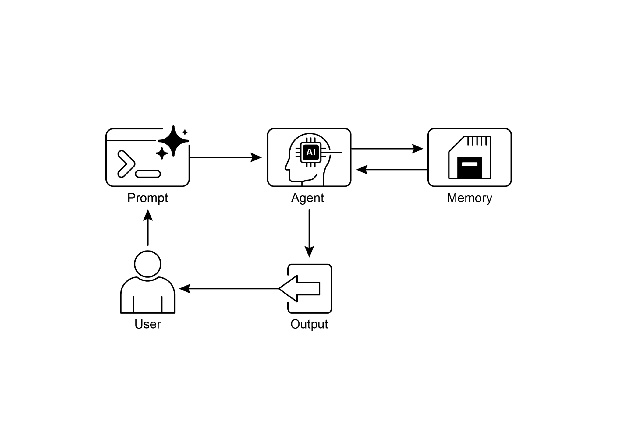
图1:内存管理设计模式
关键要点
为了快速回顾内存管理的要点:
内存对于智能体来说至关重要,它可以帮助智能体跟踪事物、学习和个性化交互。 对话式人工智能既依赖于短期记忆来处理单次聊天中的即时上下文,也依赖于长期记忆来存储跨多个会话的持久知识。 * 短期记忆(即时信息)是临时的,通常受限于LLM的上下文窗口或框架传递上下文的方式。 长期记忆(那些持续存在的信息)通过使用外部存储,如向量数据库,在不同聊天中保存信息,并通过搜索进行访问。 * 类似于ADK的框架具有特定的部分,如会话(聊天线程)、状态(临时聊天数据)和MemoryService(可搜索的长期知识)来管理记忆。 ADK的SessionService负责处理整个聊天会话的生命周期,包括其历史(事件)和临时数据(状态)。 ADK的session.state是一个用于临时聊天数据的字典。前缀(user:、app:、temp:)告诉您数据属于何处以及它是否会持续存在。 在ADK中,您应该通过使用EventActions.state_delta或output_key在添加事件时更新状态,而不是直接更改状态字典。 ADK的MemoryService用于将信息存入长期存储,并允许智能体通过使用工具进行搜索。 LangChain提供了实用的工具,如ConversationBufferMemory,能够自动将单次对话的历史记录注入到提示中,使智能体能够回忆起即时上下文。 LangGraph通过使用存储来保存和检索语义事实、情景经历,甚至可更新的程序规则,实现了高级的、长期记忆功能,跨越不同的用户会话。 内存银行是一项托管服务,它通过自动提取、存储和召回用户特定的信息,为智能体提供持久、长期记忆,从而实现跨框架如谷歌的ADK、LangGraph和CrewAI上的个性化、连续对话。
结论
本章深入探讨了智能体系统中至关重要的内存管理任务,展示了短期上下文与长期知识之间的区别。我们讨论了这些类型内存的设置方式以及在构建能够记住事物的智能体中的应用。我们详细研究了Google ADK如何提供特定的组件,如会话(Session)、状态(State)和内存服务(MemoryService)来处理这一问题。现在我们已经了解了智能体如何记住短期和长期的事物,接下来我们可以探讨它们如何学习和适应。下一个模式“学习和适应”是关于智能体如何根据新的经验或数据改变其思考方式、行为或知识。